

Changing a circular saw blade on a model without a locking button requires a steady hand and strict adherence to safety protocols. Because you cannot lock the arbor with a button, you must be careful to immobilize the blade safely while loosening the bolt. Always begin by ensuring the tool is completely disconnected from its power source to prevent accidental startup.
Step-by-Step Instructions:
- Disconnect the power: Start by unplugging the saw from the electrical outlet or removing the battery. This is the most critical step to ensure safety while working near the cutting edge.
- Access the blade: Lift the blade guard to separate it from the base plate and expose the arbor (the center shaft) and the old blade.
- Remove the mounting hardware: Use an appropriate wrench or adjustable spanner to loosen the nut or bolt on the side of the saw. Since there is no lock, you may need to carefully hold the blade or press it against a piece of wood to stop it from spinning while you unscrew the bolt.
- Detach the old blade: Once the nut is removed, gently pull the old blade outward to slide it off the arbor shaft. Pro Tip: Don’t throw away expensive carbide blades; you can often restore them to factory-sharp condition with the best circular saw blade sharpener.
- Install the new blade: Slide the new blade onto the shaft. Ensure the teeth are facing the correct cutting direction (usually pointing upward at the front of the saw). Make sure the blade is centered and seated correctly on the arbor.
- Tighten the hardware: Reinsert the bolt or nut and tighten it securely using your wrench. Ensure it is firm, but do not overtighten to the point of stripping the threads.
- Check safety guards: Put the blade guard back into position and ensure all components are tightly secured. There should be no loose parts or debris interfering with the mechanism.
- Perform a test run: Plug the saw back in and switch it on for a few seconds away from any material. Listen for unusual sounds or vibrations; if the saw runs smoothly, you are ready to cut.
Credit: thecraftsmanblog.com
How Do You Loosen the Nut on a Circular Saw?
When attempting to loosen the nut on a circular saw, it is important to first ensure that you have unplugged the saw from its power source. It can be dangerous to attempt any repair or maintenance with the saw plugged in and running. Once the power has been disconnected, you will need an adjustable wrench or a set of pliers for leverage.
Place the tool around the nut and turn counterclockwise until it loosens enough to be removed by hand. If necessary, use a lubricant such as oil or graphite powder on stubborn nuts before attempting removal. Be sure not to overtighten when reinstalling; this could cause damage and create additional issues down the line.
How Do You Change a Blade on a Craftsman Circular Saw?
Changing the blade on a Craftsman circular saw is a straightforward process, but it should be done with caution and care. First, you will need to unplug the saw from power. Next, remove the washer that holds the blade in place by loosening its screw using an appropriate-sized wrench or socket set.
Once removed, carefully slide out the old blade and insert a new one into its place making sure it’s properly aligned with the arbor hole. Then reattach the washer and tighten securely before plugging back in your saw to use again. Always exercise caution when working with tools like this; wearing safety glasses and gloves are recommended for protection against kickback or debris flying off of spinning blades.
Which Way Do You Turn to Remove Saw Blade?
When it comes to removing a saw blade, the process can vary depending on what type of saw you are working with. Generally, most hand-held circular saws and table saws will have an arbor lock that is used to loosen or tighten the blade. To remove the blade on these types of tools, simply turn the arbor lock clockwise until it locks into place.
Then use a wrench or an appropriate tool (depending on your model) to unscrew the bolt holding in the blade and carefully remove it from the saw. For reciprocating saws and jigsaws, there may be an allen key instead of an arbor lock; in which case, you would need to insert the allen key into its hole at one end of the shaft and turn counter-clockwise until it unlocks. Once unlocked, you should be able to pull out the old blades and then replace them with new ones if needed.
How Do You Change the Blade on an Old Black And Decker Circular Saw?
Changing the blade on an old Black and Decker circular saw is a fairly straightforward process. First, unplug the saw from any power source. Then, turn the blade collar counterclockwise until it releases from its locking position and can be slid off of the shaft.
Next, use an Allen wrench to loosen the screw that holds the blade in place so it can be removed. Insert your new blade into place, making sure to align it with the teeth facing forward towards you. Finally, tighten down all screws securely and slide back on your collar before plugging in your saw again for use!
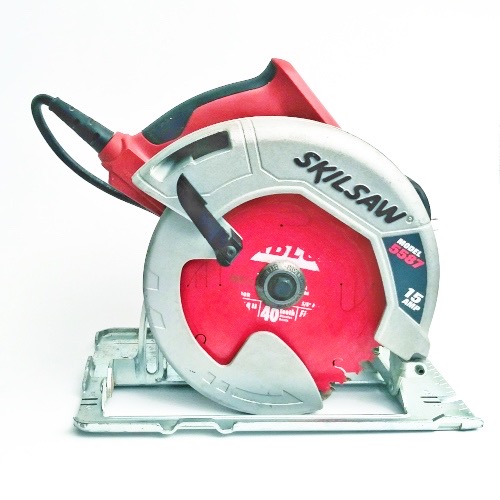
Remove saw blade without lock button: Skilsaw 5400
Skilsaw 5500 Blade Lock
The Skilsaw 5500 Blade Lock is a great tool for anyone looking to make precision cuts. This saw has an easy blade-changing system that locks the blade in place with just one lever, so you can quickly switch between blades and keep your work safe. Additionally, its ergonomic design makes it comfortable to use for long periods of time and its 15 amp motor offers more power than most saws on the market today.
With this reliable saw at your disposal, you’ll be able to tackle any woodworking job with ease!
Circular Saw Blade Stuck in Wood
If you’ve ever tried to use a circular saw and found that the blade has become stuck in the wood, don’t panic! It’s actually quite common for this to happen, especially when cutting through hardwood. The best way to get your blade unstuck is by using a pair of pliers or locking jaw pliers and gently pulling on the teeth of the blade until it loosens enough for you to pull it out.
If necessary, use some oil or lubricant around the base of the blade before attempting this method.
How to Change Blade on Skilsaw Circular Saw
Changing the blade on your Skilsaw circular saw is a relatively straightforward process. Begin by unplugging the saw, and then loosen and remove the hex bolt that holds the blade in place. Place a piece of wood underneath the blade to keep it from turning as you loosen it.
Once removed, fit in your new blade with its teeth pointing down towards the base plate, making sure to line up all of its mounting holes with those on your saw’s arbor nut. Re-tighten securely using an adjustable wrench or socket wrench before testing out your new setup!
Circular Saw Spindle Lock
The circular saw spindle lock is an important safety feature designed to prevent accidental blade movement when changing out a blade. It works by locking the spindle in place, so that it cannot move while the replacement blade is being installed. This ensures that no one gets injured during maintenance and makes sure that only properly tightened blades are used for cutting tasks.
Conclusion
Changing a circular saw blade without a lock is an essential skill for any DIYer. With the right tools, it’s relatively easy to do quickly and safely. It’s important to wear safety gear while doing this job and make sure your hands are in good shape before starting the project.
Taking your time and following these instructions will ensure that you can successfully replace the blade of your circular saw with minimal effort and risk. Replacing a circular saw blade doesn’t have to be difficult – just take it step by step!
Table of Contents